
Support the trails you love with micro-donations via Strava.
Frequently Asked Questions
-
LuvTrails connects their app (Trailcare) with your Strava account. You set your microdonation amount for every mile you recreate on the trails. When your ride is completed, you will receive an email indicating your total donation for your activity.
An email will be sent to you after every measurable activity (miles) within a registered geofenced area, even if it was just a small portion of a longer activity that was outside the geofence. For the most part it will be running, biking, hiking, walking, etc.
-
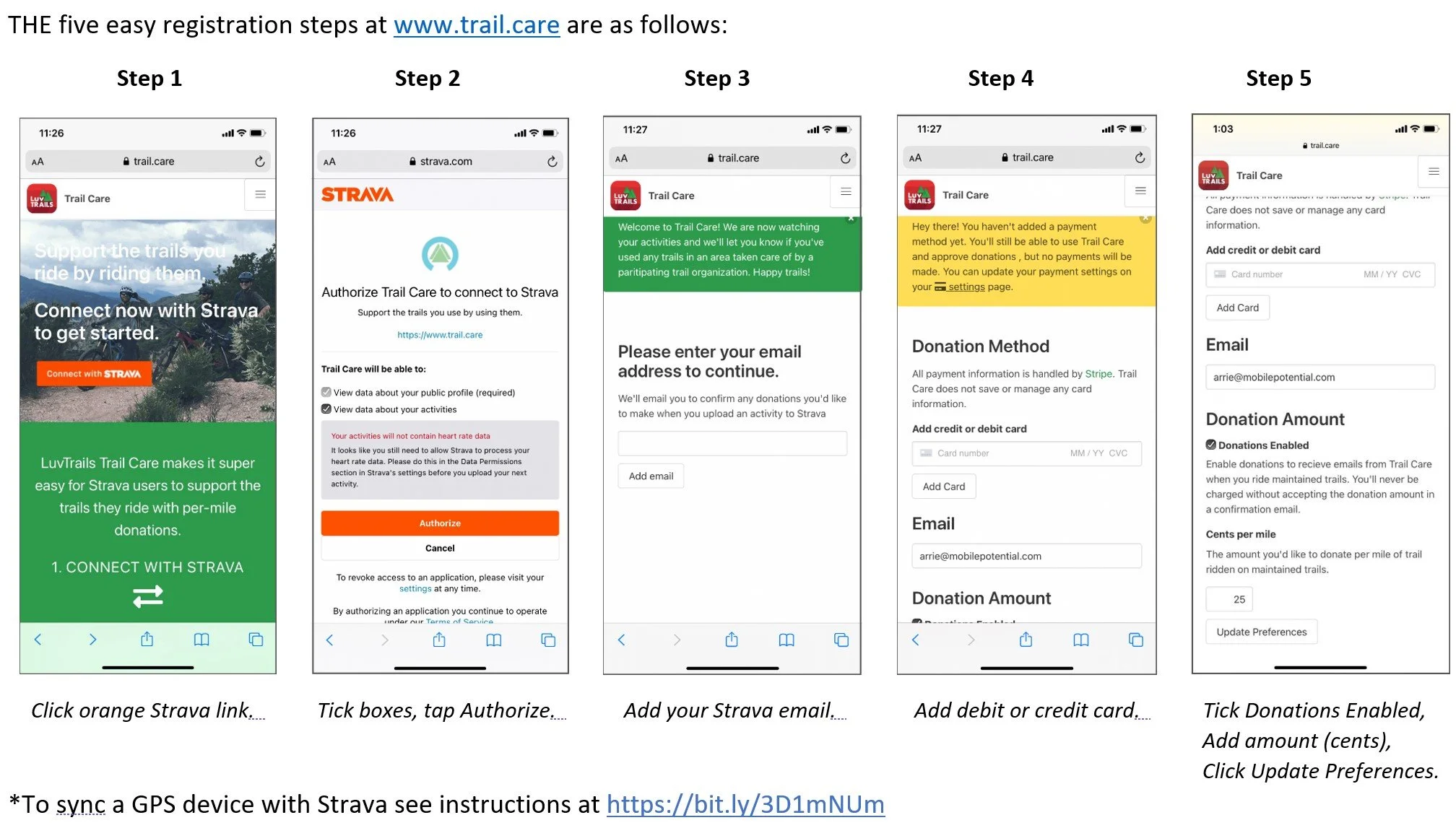
Follow the 5 easy steps below to get started Step 1: Go to www.trail.care – click on the orange Strava link. Step 2: Tick the boxes and authorize them by clicking on the orange “Authorize” tab. Step 3: Enter the same email that you use to log in to your Strava account and click “Add email”. Step 4: Add a debit or credit card to which your donation will be charged. Step 5: On the same page, tick the “Donations Enabled” box and fill in the amount (cents) per mile you will donate. Click on “Update Preferences”.
These steps are also outlined in the graphics below!
-
LuvTrails accept smajor credit cards as a payment method. They process transactions through Stripe. They do not process checks or cash donations.
-
Pisgah Area SORBA has a geophracial area set in the app which identifies the trails within their maintance cooridor. All donations within this geogrpahical area will go to Pisgah Area SORBA. If you ride in other areas which also has affiliations with LuvTrails, you will recieve an email identifying which nonprofit mantinains those trails, Pisgah Area SORBA has a designated geographic area within the app that includes the trails we maintain. Donations generated within that area are directed to Pisgah Area SORBA. If you ride in other areas that participate in LuvTrails, you'll receive an email identifying the nonprofit that maintains those trails and have the option to support them as well..
-
A linked credit/debit card is only charged when the threshold of $5 to a single organization is reached. If the threshold for a single group is not reached in 3 months the card is charged with the lesser amount.
-
Every donation needs to be approved by clicking the “donate” button in the Trailcare email. If the user does not want to donate to the relevant organization or for the specific activity you can simply delete or ignore the activity email.
-
Yes! As often as you’d like. Go to your Trailcare account settings, change the amount, and click “update preferences.”
Set Up Your Micro-Donations